Your college email ID is doing a lot less work than it should be.
Most students use it only to receive notices from the college administration and register for online courses. But that same email address unlocks hundreds of thousands of rupees worth of free and discounted software, subscriptions, tools, and services that you’d otherwise have to pay full price for.
This guide covers every major platform and discount available to Indian students right now — what you get, how to claim it, and what’s actually worth your time.
Why Companies Offer Student Discounts
Before we get into the list, it’s worth understanding why companies offer these deals.
It’s not charity. It’s strategy.
Companies like Adobe, Microsoft, and GitHub know that the tools you learn during college are the tools you push for when you get hired. If you learned Adobe Premiere in college, you’ll request Adobe licenses at your first job. If you got comfortable with GitHub Pro, you’ll advocate for it at your company.
Student discounts are essentially free customer acquisition. Companies are investing in getting you hooked on their products before you have purchasing power — and then you bring them into every workplace you enter.
This is why the discounts are genuinely good. Companies aren’t offering 10% off. They’re offering free access or 80–90% discounts because they want you using their product consistently for 4 years.
You should absolutely take advantage of this.
What You Need to Claim Most Discounts
Most platforms require one or more of the following:
A college email address ending in .edu or .ac.in Most Indian college emails end in .ac.in.
A valid student ID card Some platforms ask you to upload or photograph your college ID for verification.
Verification through a third-party service Platforms like UNiDAYS and GitHub Education verify your student status and then act as a pass for multiple brands at once.
SheerID verification Some brands use SheerID – an identity verification service – where you enter your college name, enrollment status, and upload proof.
In almost every case, verification takes less than 5 minutes. Most approvals happen instantly or within 24-48 hours.
Platform 1: GitHub Education / GitHub Student Developer Pack
What it is: GitHub’s student program gives you free access to over 100 tools and services used by professional developers — all free as long as you’re a student.
What you actually get:
- GitHub Pro (normally $4/month) — unlimited private repositories, advanced code review tools
- GitHub Copilot (normally $10/month) — AI coding assistant that writes code alongside you
- JetBrains IDEs — free access to IntelliJ IDEA, PyCharm, WebStorm, and all JetBrains tools (professional developers pay ₹15,000+ per year for these)
- Namecheap — free .me domain for 1 year (great for portfolio websites)
- DigitalOcean — $200 in cloud credits
- Microsoft Azure — $100 in Azure credits
- DataCamp — 3 months free (data science learning platform, normally ₹2,500/month)
- Name.com — free domain name for 1 year
- And 80+ more tools
How to claim:
- Go to education.github.com/pack
- Click “Get your pack”
- Sign in with your GitHub account (create one if you don’t have it)
- Enter your college email (.ac.in address)
- Upload a photo of your student ID when asked
- Approval typically takes 1–7 days
Who should get this: Every tech student, no exceptions. Even if you don’t use all 100 tools, GitHub Copilot alone is worth ₹800+ per month. This is the highest-value student offer available.
Platform 2: Microsoft Azure for Students / Microsoft 365 Education
What you get:
- Azure for Students: $100 in free cloud credits – no credit card required. You can build, host, and run applications on Microsoft’s cloud infrastructure for free.
- Microsoft 365 Education: Free access to Word, Excel, PowerPoint, Teams, OneNote, and 1TB of OneDrive storage – as long as you’re a student.
How to claim Azure for Students:
- Go to azure.microsoft.com/en-us/free/students
- Click “Activate now”
- Sign in with your Microsoft account (or create one)
- Verify with your college email
- Credits activate within minutes
How to claim Microsoft 365:
- Go to microsoft.com/en-us/education/products/office
- Click “Get Office 365 Education”
- Enter your college email
- Follow the setup steps
Why it matters: Azure cloud knowledge is valuable on your resume. Using free credits to host projects and learn cloud concepts is something many freshers skip – it’s a differentiator when you can list actual cloud project experience.
Platform 3: JetBrains Student License
What it is: Free access to all JetBrains IDEs – the gold standard for professional development environments.
Tools included:
- IntelliJ IDEA Ultimate (Java, Kotlin, Scala – the best Java IDE available)
- PyCharm Professional (Python – used by data scientists and backend developers)
- WebStorm (JavaScript, TypeScript, React, Vue)
- DataGrip (databases and SQL)
- CLion (C and C++)
- GoLand (Go language)
- And 8 more specialized tools
Cost without student license: ₹15,000-25,000 per year for professional licenses.
How to claim:
- Go to jetbrains.com/community/education/#students
- Click “Apply Now”
- Choose “University Email Address” as verification method
- Enter your .ac.in email
- Complete the form
- License is sent to your email within 1-2 days
Renewal: Renew every year by verifying you’re still a student. License is valid as long as you’re enrolled.
Platform 4: UNiDAYS
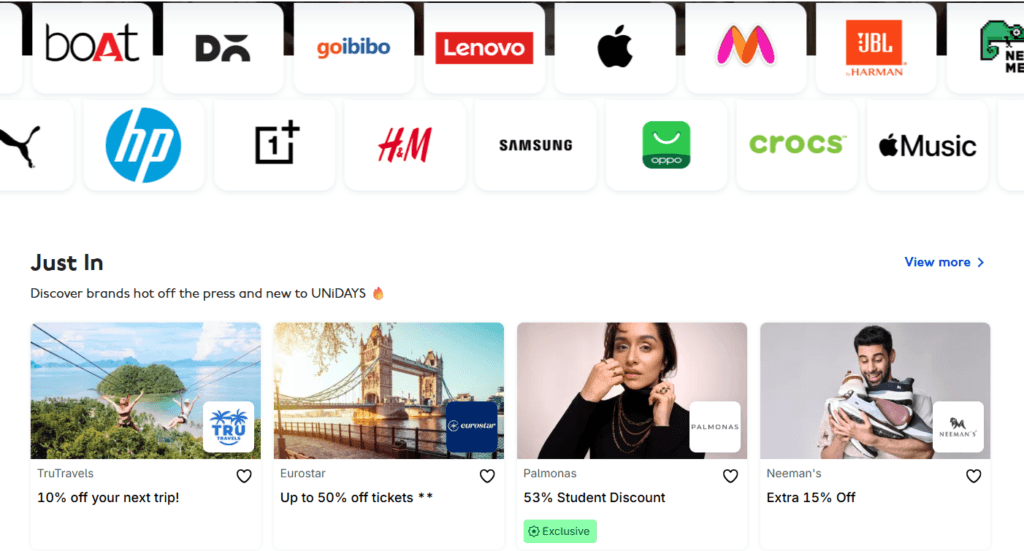
What it is: A platform that provides verified student discounts across 300+ brands. One verification gives you access to all brands in the network.
Major discounts available to Indian students:
- Samsung — up to 10% off phones, tablets, and laptops
- Apple — educational pricing on MacBooks and iPads (typically 5–10% off + free AirPods on select products during back-to-school)
- Dell — 10–15% off laptops and accessories
- Adidas — up to 30% off
- Nike — 20% off
- HP — 10–15% off laptops and printers
- Lenovo — 5–10% off
- Fossil — 20% off watches
- Spotify Premium — student plan available through student verification (₹59/month instead of ₹119)
How to claim:
- Go to myunidays.com
- Click “Get Verified”
- Sign up using your college email or upload student ID
- Once verified, browse offers and claim discount codes
Important note: Some brands on UNiDAYS ship only within specific regions or have limited availability for Indian students. Check the offer terms before assuming a discount applies to your location.
Platform 5: Canva for Education / Canva Pro Student
What it is: Canva Pro free for students through Canva for Education. Canva is used for presentations, posters, social media graphics, resumes, and design work.
What you get with Pro (normally ₹4,000/year):
- 100 million+ premium elements, photos, and templates
- Background remover tool
- Brand kit for consistent design
- Resize designs for any platform
- Premium fonts and animations
- 100GB of storage
How to claim:
- Go to canva.com/education
- Click “Get Canva for Education”
- Verify your student status with your college email
- Pro features activate immediately
Who should use this: Non-tech students especially — for building professional-looking resumes, presentations, and portfolios. Also useful for any student who wants to build personal branding content on LinkedIn.
Platform 6: Notion for Education
What it is: Notion is a productivity and note-taking tool used by students and professionals for organizing notes, projects, and research. The Plus plan is free for students.
What you get free (normally $8/month):
- Unlimited pages and blocks
- Unlimited file uploads
- Collaborative workspace features
- Templates for note-taking, project management, study plans
How to claim:
- Go to notion.so/product/notion-for-education
- Click “Get Notion free”
- Verify with your college email
- Plus plan activates immediately
Why it’s useful: Most students who use Notion for organizing their coursework, projects, and job applications end up significantly better organized than those who don’t. It’s a meaningful productivity tool, not just another app to download.
Platform 7: Figma for Education
What it is: Figma is the industry-standard UI/UX design tool used by product designers, frontend developers, and product teams.
What you get free (Professional plan, normally $12/month):
- Unlimited projects
- Unlimited collaborators
- Version history
- All professional features
How to claim:
- Go to figma.com/education
- Click “Get verified”
- Apply with your .edu or .ac.in email
- Verification takes 1-5 business days
Who should use this: Anyone interested in product design, UI/UX, frontend development, or product management. Figma is listed as a required skill in many product and design job descriptions. Being familiar with it before your first job is a genuine advantage.
Platform 8: Autodesk for Students
What it is: Autodesk makes AutoCAD, Fusion 360, Revit, Maya, and many other design and engineering tools. These are expensive professionally – ₹50,000+ per year in some cases. Students get them free.
Tools available free:
- AutoCAD – industry standard for engineering drawings
- Fusion 360 – 3D CAD, CAM, and PCB design
- Revit – architectural design
- Maya – 3D animation and modeling
- 3ds Max – 3D modeling and rendering
How to claim:
- Go to autodesk.com/education/edu-software/overview
- Create an Autodesk account
- Verify your student status with college email and student ID
- Download any available products
Who should use this: Mechanical, civil, electrical, and architecture students. AutoCAD and Fusion 360 experience on your resume is directly relevant for core engineering roles. Don’t wait until you need it for a job – learn it while you have free access.
Platform 9: AWS Educate
What it is: Amazon’s free program for students learning cloud computing. Provides free access to AWS services and learning content.
What you get:
- Free starter account credits (no credit card required)
- Access to AWS learning labs and courses
- Hands-on lab environments to practice cloud concepts
- Community forum access
How to claim:
- Go to aws.amazon.com/education/awseducate
- Click “Join AWS Educate”
- Fill in the form with your college email
- Approval within 2-3 days
Why it matters: Cloud skills are among the most in-demand in the Indian tech job market. AWS is the market leader. Getting hands-on experience with actual AWS services – even basic ones like EC2, S3, and Lambda – adds real value to your resume.
Platform 10: Grammarly Premium for Students
What it is: Grammarly is a writing assistant that checks grammar, clarity, tone, and style. The premium version catches more issues and gives detailed suggestions.
How to get it discounted: Some universities provide institutional Grammarly licenses – check with your college if yours does. If not, Grammarly offers a 20% student discount on the annual plan through SheerID verification.
Alternatively: The free version of Grammarly is genuinely useful for most purposes. Premium matters most for professional writing – reports, emails, and cover letters.
Other Discounts Worth Knowing About
Spotify Student Plan ₹59/month (instead of ₹119) with a 3-month free trial. Includes Spotify Premium and access to Hulu (US-only benefit). Available at spotify.com/in-en/student.
YouTube Premium Student Not always available in India but worth checking – significantly discounted in markets where it’s offered.
Coursera for Campus Some Indian universities have institutional agreements with Coursera that give students free access to the full catalog. Check with your college library or academic office.
NPTEL Swayam Courses Completely free. Not a discount – these are Indian government-funded courses from IITs and IIMs. Quality is high and the certificates are recognized by many Indian companies.
LinkedIn Learning LinkedIn provides 1-month free trials regularly. Students with a LinkedIn Premium Student account get access to LinkedIn Learning’s full course library. Worth using during job application season.
How to Claim Multiple Discounts at Once
You don’t have to do these one by one over months. Set aside one afternoon and claim them all.
Recommended order:
- GitHub Student Developer Pack first – it unlocks the most tools and includes access to many other paid platforms
- Microsoft Azure for Students – cloud credits with no credit card required
- JetBrains – free IDEs for developers
- UNiDAYS – one verification gives access to 300+ brand discounts
- Canva Pro – if you use design tools
- Notion Plus – for productivity
- Figma – if you’re in a design-adjacent field
- Autodesk – if you’re in engineering or architecture
- AWS Educate – for cloud learning
Total time to claim all of these: 2-3 hours one afternoon. Total savings: Potentially ₹50,000-1,00,000+ worth of software and tools over your remaining time as a student.
What to Actually Use (And What to Skip)
Not every tool here is worth your time even if it’s free. Here’s an honest breakdown:
Absolutely use these:
- GitHub Student Pack (highest value, no question)
- Microsoft 365 Education (free Word, Excel, PowerPoint)
- JetBrains (if you code professionally – better than VS Code for many use cases)
- Canva Pro (useful for everyone)
- Notion Plus (if you want to get organized)
Use these if they’re relevant to your goals:
- Azure / AWS credits (if you’re interested in cloud computing)
- Figma (if you’re interested in UI/UX or product)
- Autodesk (if you’re in engineering/architecture)
- Grammarly (if you write a lot)
Skip or deprioritize:
- Tools you’ll create an account for and never open again
- Certifications on platforms you don’t have time to actually complete
- Discounts on brands you weren’t going to buy from anyway
The goal isn’t to collect free accounts. It’s to actively use tools that develop your skills and make you more productive.
Frequently Asked Questions
My college email doesn’t end in .ac.in – will these discounts still work? Most platforms accept any institutional email – .edu.in, .edu, university-specific domains. If the platform doesn’t recognize your domain automatically, look for an option to upload your student ID instead.
I graduated recently. Can I still use these? Most programs require you to be actively enrolled. Once you graduate, your access typically continues until the end of that academic year, then is revoked. GitHub asks you to re-verify annually.
Is it legal to use these discounts? Yes, completely. These are programs companies have set up specifically for students. You’re not exploiting anything – you’re using benefits designed for you.
What if my college email stops working? If your college deactivates your email after graduation, make sure you’ve downloaded what you need and backed up your files before that happens. Some tools like GitHub allow you to transition to a paid plan after student status ends.
Should I give my personal details to these platforms? Stick to major platforms (GitHub, Microsoft, JetBrains, UNiDAYS). For lesser-known platforms, check reviews before signing up and avoid giving financial information.
Can I share my discount codes with friends? This depends on the platform. UNiDAYS discount codes are typically single-use and tied to your account. Sharing them violates the terms of most programs. Don’t do it – it can result in your account being banned.
Your college email is a temporary asset. You have it for maybe 3-4 more years. Use it while you can.
The tools you build experience with during this time – GitHub, Azure, JetBrains, Figma, AutoCAD – are the same tools companies use professionally. Every hour you spend with them as a student is an hour that pays off in your career.
Start with the GitHub Student Developer Pack. Everything else from there.