

Introduction
Your GitHub profile is like your online coding portfolio. For freshers, it can help recruiters, interviewers, and hiring teams quickly understand your skills, projects, and learning progress.
Many freshers create a GitHub account but do not use it properly. Some profiles are empty, some have unclear project names, and some repositories do not have README files. Because of this, even good projects may not create a strong impression.
A professional GitHub profile does not need to be complicated. It should clearly show who you are, what skills you are learning, what projects you have built, and how someone can contact or verify your work.
In this guide, you will learn how to create a clean and professional GitHub profile step by step. You can also use the Before and After examples below to understand how a simple profile can be improved.
Before and After GitHub Profile Example
Before creating a professional GitHub profile, many freshers have a profile that looks incomplete. It may not explain their skills, projects, or learning direction clearly.
Before:
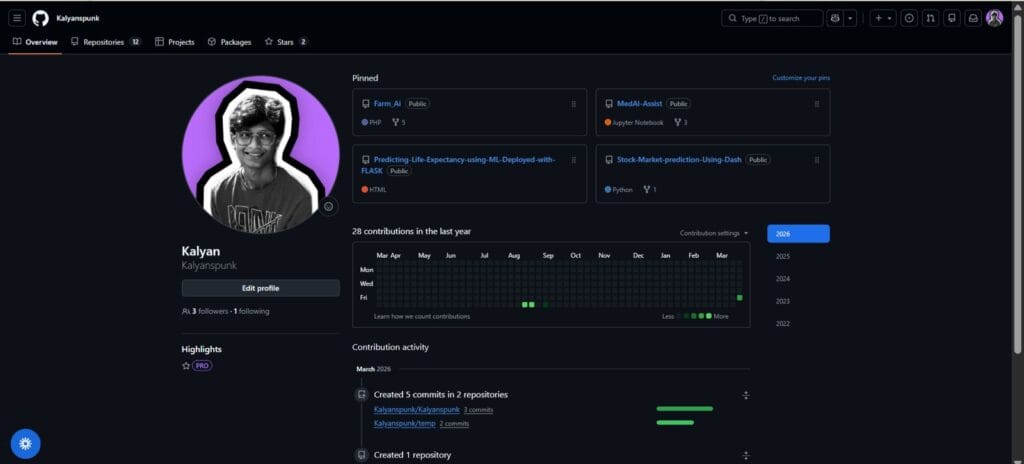
Before: An incomplete GitHub profile usually does not explain the student’s skills, projects, or career focus clearly.
After:
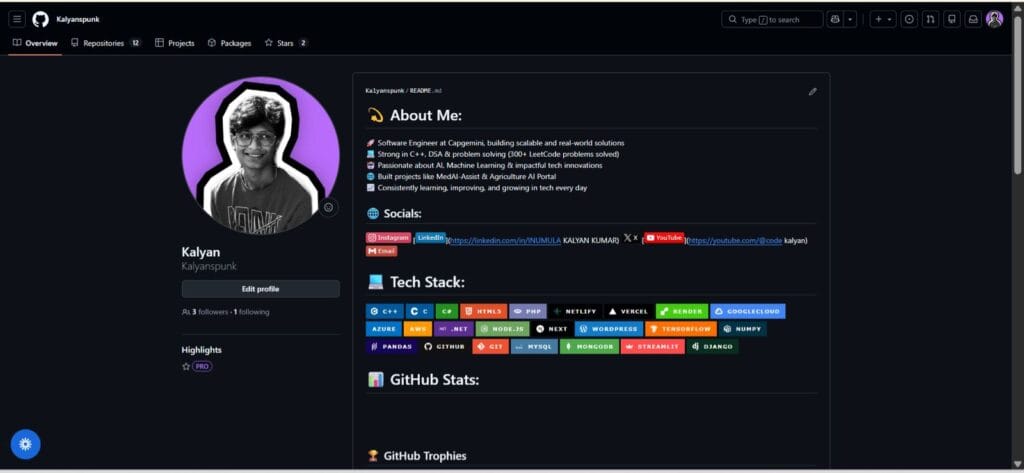
After: A professional GitHub profile clearly shows your introduction, skills, projects, social links, and learning focus.
Why GitHub Profile Matters for Freshers
Freshers usually do not have years of work experience. That is why projects become important. A resume can say that you know Java, Python, React, SQL, or web development, but GitHub can show proof of your learning.
When your GitHub profile is organized properly, it helps recruiters understand your practical skills. They can see your project names, README files, code structure, and the technologies you have used.
GitHub alone will not guarantee a job. But a clean GitHub profile can support your resume, LinkedIn profile, and job applications.
Step-by-Step Guide to Create a Professional GitHub Profile
Step 1: Choose a Professional GitHub Username
Your username should look clean and professional because you may add it to your resume and LinkedIn profile.
Good examples:
- rahulkumar
- rahul-kumar-dev
- priya-sharma
- priya-data
Avoid usernames that look casual or unprofessional, such as coolcoder123, hackerking007, or randomname999.
Step 2: Add a Short and Clear Bio
Your GitHub bio should explain who you are and what you are learning. Keep it simple and specific.
Example:
B.Tech fresher interested in web development, JavaScript, React, and full-stack projects.If you are interested in data roles, you can write:
Entry-level data analyst learning SQL, Excel, Python, and Power BI.Step 3: Create a GitHub Profile README
A profile README is a special file that appears on your GitHub profile page. It helps visitors understand your skills, projects, and contact links quickly.
To create it, make a new repository with the same name as your GitHub username. Then create a file called README.md inside it.
Your profile README can include:
- Short introduction
- Skills
- Current learning focus
- Best projects
- LinkedIn or portfolio link
Step 4: Use a GitHub README Generator Tool
If you are a beginner and do not know how to design a README manually, you can use a GitHub profile README generator tool.
The process is simple:
- Open the README generator website
- Enter your name, skills, social links, and project details
- Generate the README code
- Copy the generated code
- Paste it into your GitHub profile README.md file
This method is useful for freshers because it saves time and gives a clean starting structure. After generating the code, you should still edit it manually and keep only the details that are true and useful.
Step 5: Add Your Skills Clearly
Do not add every technology you have heard of. Add only the skills you are actually learning or can explain in an interview.
For example:
- Programming: Java, Python, JavaScript
- Web Development: HTML, CSS, React
- Database: SQL, MongoDB
- Tools: Git, GitHub, VS Code
Step 6: Pin Your Best Projects
GitHub allows you to pin repositories on your profile. These pinned projects are the first things recruiters may see.
Pin projects that are complete, useful, and easy to understand. Avoid pinning empty repositories or copied tutorial projects without explanation.
Good projects to pin:
- Portfolio website
- Expense tracker app
- Job portal project
- Weather app
- Data analysis dashboard
- College final year project
Step 7: Write README Files for Every Project
Every important project should have its own README file. A recruiter should understand your project without opening every code file.
A good project README should include:
- Project title
- Short description
- Features
- Tech stack
- How to run the project
- Screenshots if available
- Live demo link if available
- What you learned
Step 8: Add Live Demo Links
If your project is a website or web app, try to host it online. A live demo helps recruiters check your work quickly.
You can use free platforms such as GitHub Pages, Netlify, or Vercel for frontend projects.
Step 9: Keep Your Profile Clean
A GitHub profile should not look messy. If you have old test repositories, practice files, or incomplete projects, you can make them private.
Keep your best work public. Quality is more important than quantity.
Common GitHub Profile Mistakes Freshers Should Avoid
- Using an unprofessional username
- Leaving the profile README empty
- Uploading projects without explanation
- Pinning incomplete repositories
- Adding too many badges and animations
- Keeping broken project links
- Uploading API keys or private information publicly
Useful Internal Resources
- ATS-Optimized Resume Template for Freshers
- Top Skills Every Fresher Should Learn in 2026
- Latest Fresher Jobs in India
Frequently Asked Questions
Is GitHub important for freshers?
GitHub is useful for software, web development, data, cloud, DevOps, and AI-related roles. It helps you show practical work beyond your resume.
How many projects should I add to GitHub?
For freshers, 3 to 6 good projects are enough. It is better to have fewer well-explained projects than many incomplete repositories.
Can I use a GitHub README generator?
Yes, beginners can use a README generator to create a starting structure. But you should edit the generated content and make sure it matches your real skills and projects.
Should I add GitHub to my resume?
Yes, if your GitHub profile has useful projects and clean documentation. Add it near your LinkedIn link or inside your project section.
Conclusion
A professional GitHub profile can make your fresher resume stronger. It gives recruiters a place to see your projects, skills, and practical learning.
You do not need a perfect profile. Start with a clean username, simple bio, profile README, pinned projects, and clear project documentation.
Before applying for jobs, open your GitHub profile like a recruiter and check whether your best work is easy to understand. If your profile explains your skills clearly, it can support your job search in a positive way.